Goal Setting Guide
Your baselines are in. Here's what happens when your clinician builds your personalized plan.
What is Goal Setting?
Goal setting is the phase between completing your onboarding baselines and the start of your active cycle. You don't do anything in the app during this time — your clinician does the work.
Your clinician reviews your baseline data, lab results, biometrics, and health history, then uses Chiron to generate a ranked list of evidence-based recommendations personalized to you. They then select the goals they believe are most appropriate for your first cycle, assign specific weekly targets, and optionally generate nutrition and workout plans.
When the plan is ready, your WellPath Score unlocks and you receive a notification. The app shifts from onboarding mode to an active view, and your goals become visible for review.
Chiron Analysis
AI-generated recommendation candidates ranked by clinical impact
Goal Assignment
Clinician selects goals, sets targets, and schedules your plan
Score Unlock
Your WellPath Score becomes visible for the first time
Your WellPath Score Unlocks
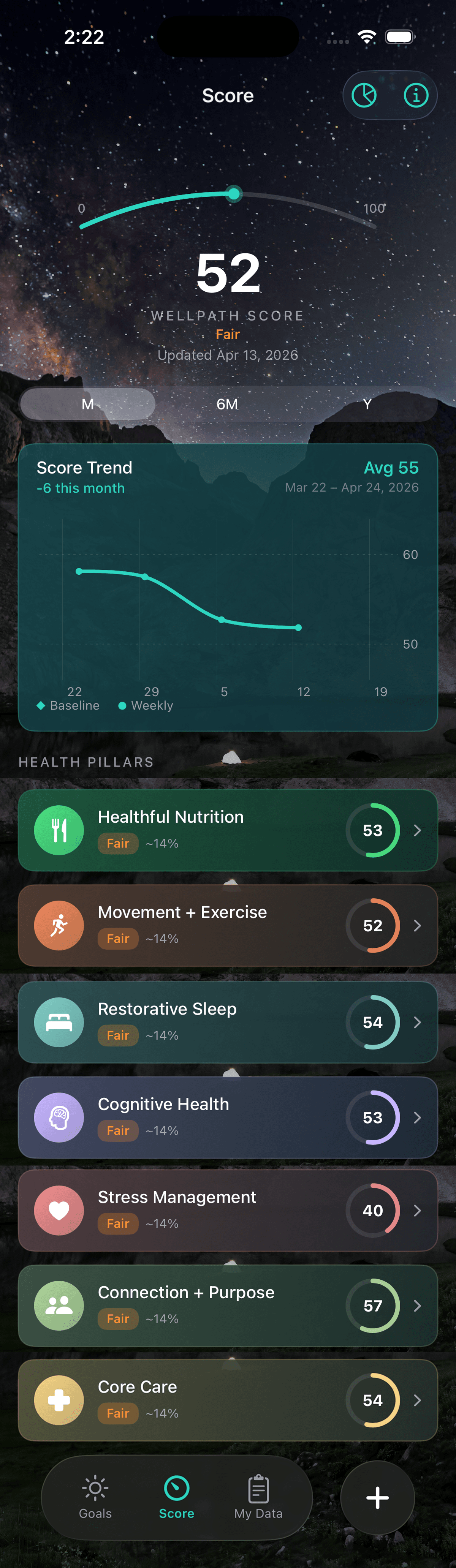
The first visible change when goal setting completes is that your WellPath Score appears. During onboarding the Score tab shows a placeholder — once your plan is pushed, the tab becomes live with your actual score.
Score Tab
The Score tab shows your WellPath Score — a single number (0–100) representing your overall health trajectory across all seven pillars.
How Your Plan Is Built
Your clinician doesn't pick goals arbitrarily. They use Chiron's analysis of your data to make evidence-based decisions. Here's what that process looks like from the clinician's side.
Chiron Reviews Your Data
Chiron analyzes your baseline responses, lab results, and biometric measurements to identify patterns, gaps, and opportunities. It generates a ranked list of recommendation candidates — each one tied to specific data points in your profile.
Clinical Impact Ranking
Candidates are ranked by clinical impact — how much improvement this goal is likely to drive in your WellPath Score given your current data. Your clinician sees this ranking alongside supporting rationale from your baselines and biomarkers.
Goal Assignment
Your clinician selects which goals to include, adjusts targets if needed, and sequences the plan across weeks. They may also add nutrition targets and generate a custom workout plan.
Plan Narration
Chiron generates a written summary of your plan — the rationale behind each goal, what to expect in week one, and how the goals connect to your health data. This becomes your plan overview in the app.
Goal setting typically takes 1–3 days after you complete baselines. Your clinician needs time to review your data and configure your plan. You will receive a push notification when your plan is ready.
Your Goals
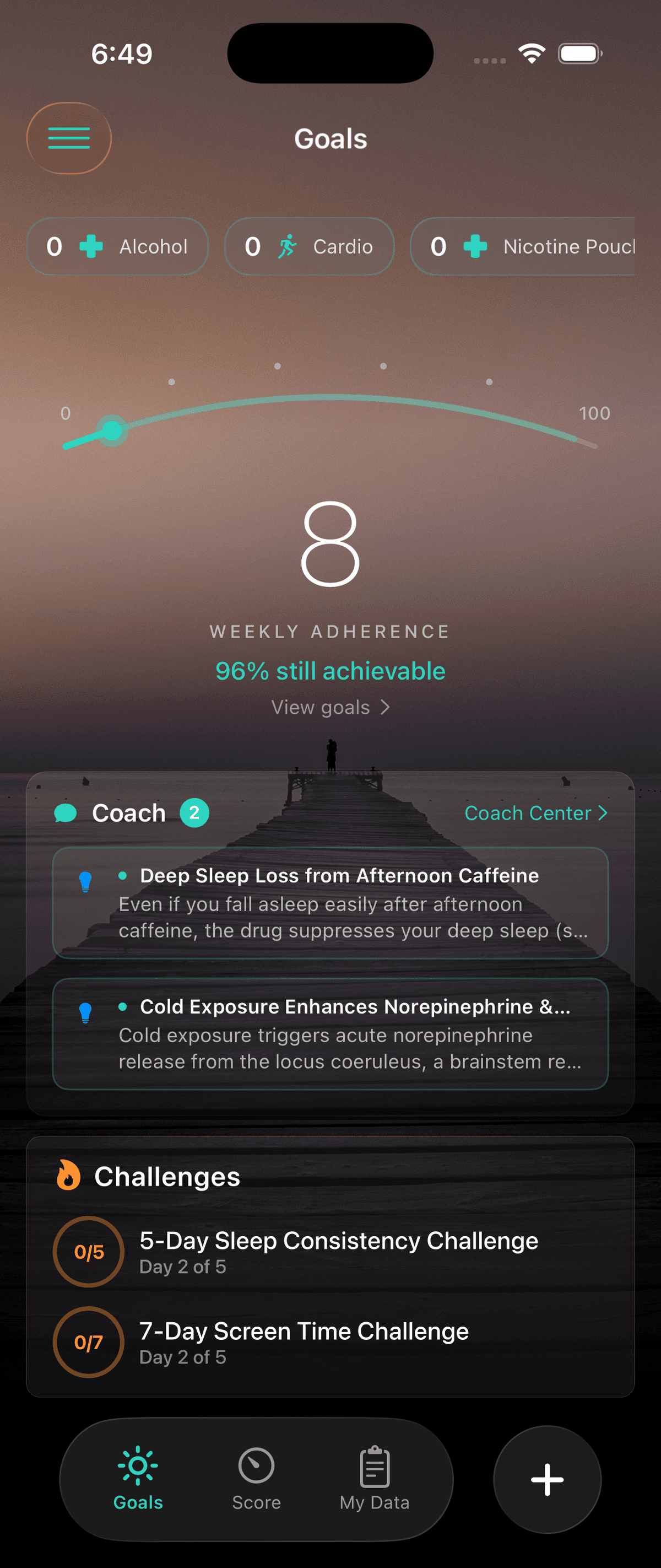
Once your plan is pushed, the Goals tab becomes your main home screen. Here's what you'll see when the plan arrives.
Goals Tab
The Goals tab shows all your active goals as individual cards, plus a weekly adherence arc at the top.
Nutrition & Workout Plans
In addition to your tracked goals, your clinician may generate a custom nutrition plan or workout plan. These are available from the side menu and serve as guided starting points.
Nutrition Plan
A weekly meal plan built around your nutrition goals — protein targets, calorie range, dietary restrictions, and food preferences you set during onboarding. Includes breakfast, lunch, dinner, and snacks.
Workout Plan
A structured weekly workout schedule aligned with your movement goals — cardio targets, strength days, HIIT sessions, and mobility work. Tailored to your fitness level and limitations from onboarding.
Plans are optional. Not every clinician generates them for cycle 1. If you don't see a plan in the side menu, your clinician may add one later or your tracked goals may not require structured plans.
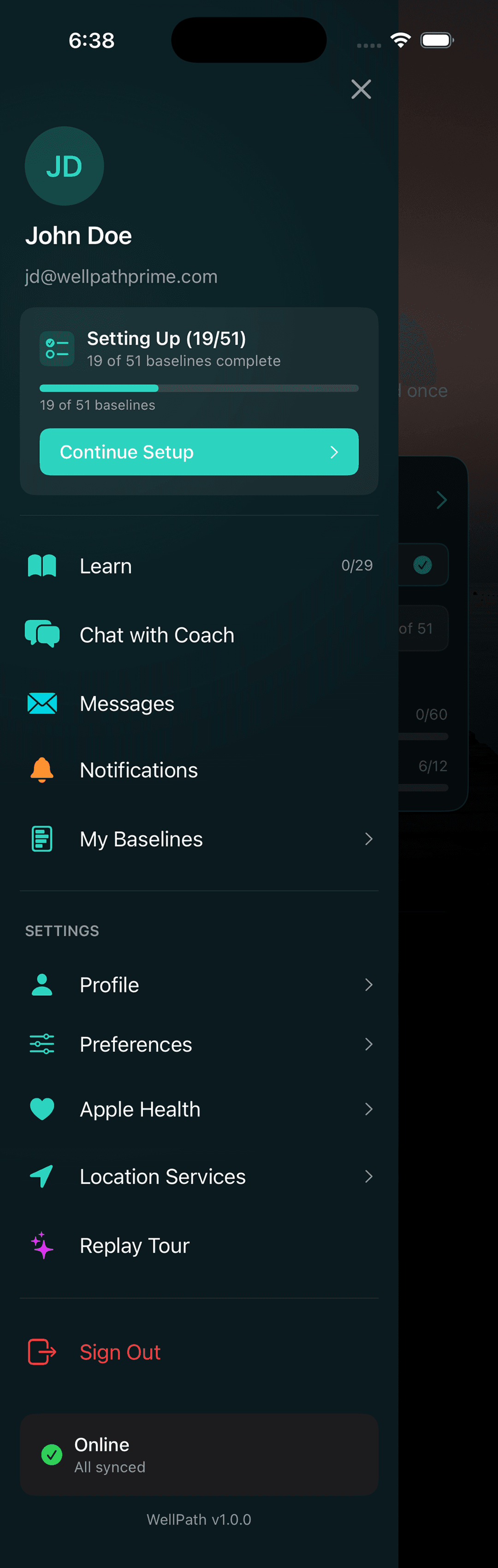
Plans appear in the side menu once generated
Accepting Your Plan
In most cases, your plan goes live immediately when your clinician pushes it. Some practices use a review step where you and your clinician walk through the plan together before it activates — check with your practice about their workflow.
Reading the Plan Narrative
Your plan comes with a written overview from Chiron explaining the rationale behind each goal. Read it — it connects your specific data to the goals assigned. Understanding why each goal was chosen makes you more likely to stick with it.
What If Something Doesn't Fit?
If a goal doesn't match your lifestyle or you have a concern about a target, message your clinician through the Messages tab in the side menu. Goals and targets can be adjusted anytime during the active phase — they are not locked in.
Week 0 and First Full Week
The first partial week of your cycle is called Week 0. It's a warm-up period — targets are prorated based on how many days remain before Monday. Don't stress about Week 0 numbers. Your first meaningful tracked week is Week 1, which begins the following Monday.
What's Next
You're in the active phase now. Your goals are live, your score is tracking, and Chiron is watching your data to send challenges and nudges. The Active Phase guide covers everything from here.
Using Your Goals Tab
your main home screen — goal cards, weekly adherence arc, coach section
Daily Logging
quick add, food log, and Apple Health — how data gets into the app
Challenges
Chiron generates short-term pushes based on your progress patterns
Chiron Engagement
daily briefs, tips, check-ins, and how to get the most from the coach
Your Score Over Time
how behavior, biomarker, biometric, and education scores evolve
Learn Section
300+ articles organized by pillar — reading earns education score points